Sunday, October 17, 2010


Importing Objects into Open Wonderland
 |
| Finally got chairs into Open Wonderland |
 |
| This is what happens every time I try to get into the Placemarked area. I tried 7 or 8 times with the same result. Could this be due to a Java upgrade that I did. |
 |
| I showed that I could upload my Objects into Open Wonderland. They are in the wrong place because I have not been able to get into Place mark area yet. Not sure if it is due to Java Upgrade. |
Reading about the Land Tool on Wiki Second Life the Changing Terain to Appear More Moon-Readlike
 |
| Reading Wiki About Land Tool |
 |
| Flattening Terain to be more like the moon |
 |
| Using the Environmental Editor In Other World to make it appear more Moon-Like |
 |
| The Final Product Look much More like a Moonscape |
Read How to Input 3 D Sketch Up Models into Open Wonderland
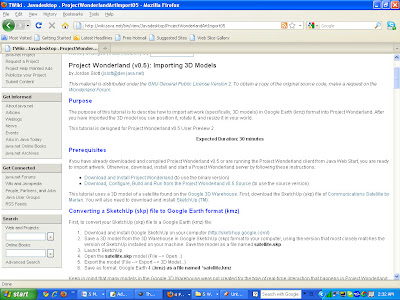 |
| I read about how to input Google Sketchup models into Open Wonderland on Wiki. A link I found through openwonderland.org. |
Following Along with Sketch Up New User Video #4 Building Chairs
 |
| Building a chair in Sketch Up using the remove technique |
 |
| Finished Chair built with Remove Technique in Sketch Up |
 |
| Building an Chair Using the Add Technique |
 |
| Chair Built with add technique with Construction guides visible in Sketch Up |
 |
| Two completed Chairs built with different techniques. |
Floowing along with Sketch Up Video 3
 |
| Using the Sketch Up Push Pull Tool to first create a wall then cut a round hole in it. |
 |
| Using the Move Tool in Sketch up to slant a surface. |
 |
| Using the Inference tool to align two elements in Sketch Up |


Demonstrating New To Sketch Up Techniques from Video 2
 |
| Drawing Edges In Sketch Up |

 |
| Using Healing Technique to create a Co-planer surface in sketch up |

 |
| Using Inference Points and demonstrating that you do not draw across lines in Sketch Up |

Subscribe to:
Posts (Atom)